
 Search within the site


1
Overview
We developed an original workflow, “RAD Link,” by integrating the plain radiography console “CS-7,” the radiology information system “FINO.WorkManage,” the dose management system “FINO.XManage,” and the plain radiography management function “RADInsight,” creating a new workflow for plain radiography. In X-ray plain radiography operations, “RAD Link” allows users to move directly from the patient registration screen in “FINO.WorkManage” to the “CS-7” screen, enabling imaging without switching between terminals. In addition, displaying “RADInsight” alongside the patient registration screen and enabling the advanced identification of rejected and reference images reduces retakes and improves overall imaging efficiency. Furthermore, linking “FINO.WorkManage” and “FINO.XManage” enables convenient creation of exposure record based on accumulated dose information. This paper introduces the system configuration and features of “RAD Link,” focusing on these three characteristics.
2
Details
■Configuration
1. RAD Link imaging workflow
In the “RAD Link imaging workflow,” the patient registration screen normally used on the plain radiography console “CS-7” is replaced by the patient registration screen of the radiology information system “FINO.WorkManage” through a remote operation function. This eliminates the need to perform patient registration on CS-7 (Fig. 1).
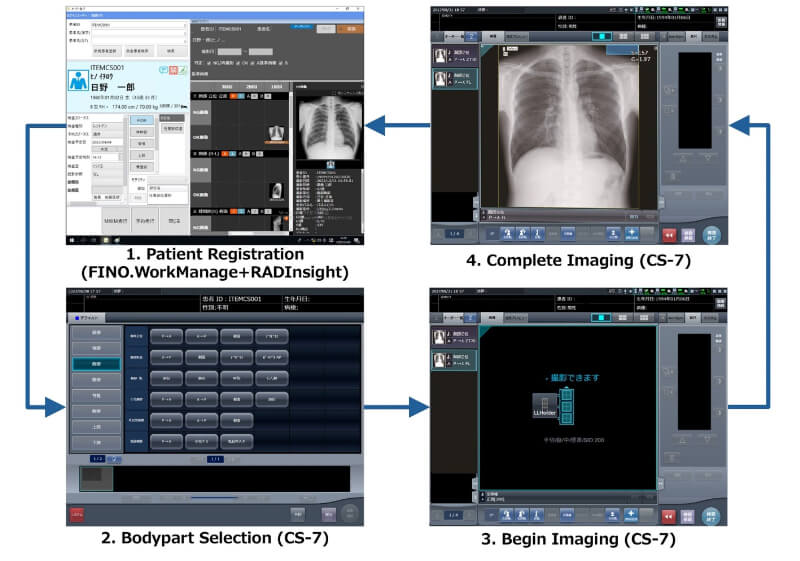
Fig. 1 RAD Link imaging workflow
On the “FINO.WorkManage” patient registration screen, users can register or select patient and examination information. When a patient is selected, the plain radiography management function “RADInsight” screen is displayed, allowing users to review past rejected-image information for that patient (Fig. 1).
When “Order issuance (MWM issuance)” is executed on the patient registration screen, “FINO.WorkManage” issues an order to “CS-7”. After entering any additional imaging information on “CS-7,” imaging begins. Upon completion, the screen automatically returns to the “FINO.WorkManage” patient registration screen, enabling the user to proceed seamlessly to the next examination.
2. Exposure record creation flow
In the “exposure record creation flow,” in addition to the patient information required for the exposure record, radiologic technologist information is registered in “FINO.WorkManage” and transmitted to “CS-7” (Fig. 2). After imaging is completed on “CS-7,” dose information (RDSR), including examination information, is sent to the dose management system “FINO.XManage” for management. Information on the requesting department and the requesting physician that is not included in the RDSR is supplemented through linkage between “FINO.WorkManage” and “FINO.XManage,” enabling output of the information required for the exposure record. Dose information, examination information, and patient information accumulated in “FINO.XManage” can then be extracted, and the exposure record can be output in Excel format.
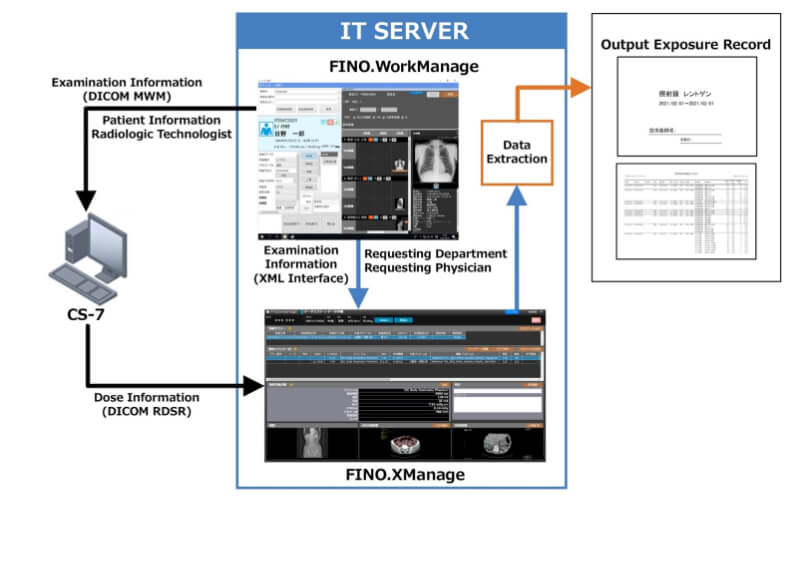
Fig. 2 Exposure record flow
■Functions / Features / Applications
1. RAD Link imaging workflow
Conventionally, linking the plain radiography console “CS-7” with the radiology information system “FINO.WorkManage” enabled the replacement of the pre-examination patient registration screen on “CS-7” with the “FINO.WorkManage” screen. With the original workflow “RAD Link,” however, it is now also possible to display past images, rejected images, reference images, and imaging conditions managed by the plain radiography management function “RADInsight” directly on the “CS-7” screen. This function is expected to provide the following effects (Figs. 3 and 4):
• Improved efficiency of imaging operations and prevention of retakes through advance review of past rejected images, understanding patient-specific positioning tendencies, and preparation before imaging;
• Highly reproducible imaging through review of past images;
• Optimization of imaging conditions through confirmation of past imaging parameters; and
• Standardization of imaging through review of reference images for patients without prior images.
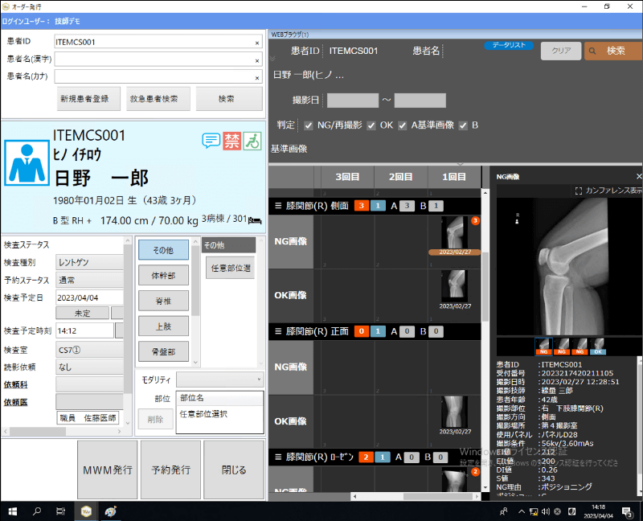
Fig. 3 FINO.WorkManage screen incorporating RADInsight
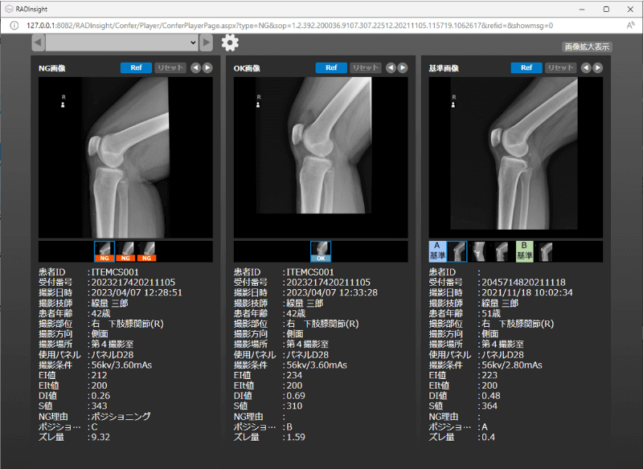
Fig.4 RADInsight screen (rejected images, past images, reference images)
2. Exposure record creation flow
Through the original workflow “RAD Link,” information required for exposure record creation is automatically accumulated, thereby improving the efficiency of exposure record creation tasks. A key feature is that the exposure record uses dose information (RDSR) accumulated in the dose management system, enabling the output of dose data from actual imaging procedures (Fig. 5).
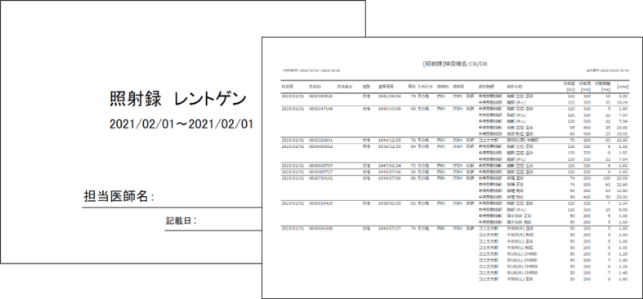
Fig.5 Exposure record
■Future outlook
As a vendor responsible for overall medical systems, with a particular focus on solutions for plain radiography FPDs, we pursue product development by emphasizing the synergistic value generated through system integration. The new workflow “RAD Link” was realized through efforts to integrate multiple products into a unified system. We will continue to contribute to safer, more secure, and higher-quality healthcare by providing solutions grounded in the perspectives of clinical sites and patients.